
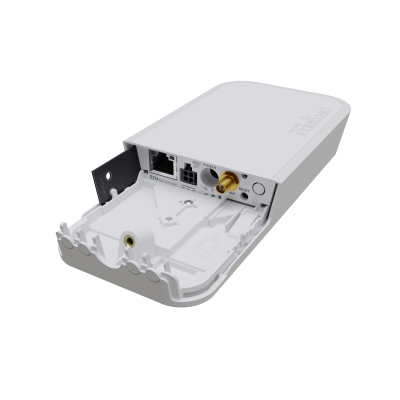


MikroTik wAP LR2 Kit LoRa 2.4GHz IoT Gateway IP54
The MikroTik wAP LR2 kit (RBwAPR-2nD&R11e-LR2) is an outdoor 2.4 GHz LoRa® IoT gateway — R11e-LR2 miniPCIe LoRa card (2.4 GHz Chirp spread spectrum, 4.7 dBi built-in LoRa antenna), pre-installed UDP packet forwarder to public or private LoRa servers, single-core MIPSBE QCA9531 at 650 MHz, 64 MB RAM, 16 MB FLASH, RouterOS v7 License 4, 2.4 GHz 802.11b/g/n Wi-Fi 4 2-chain 300 Mbps backend (2 dBi built-in WLAN antenna), 1× 10/100 Ethernet with passive PoE-in (9–30V), DC jack 9–30V, automotive input 9–30V, 1× Mini SIM slot, 1× miniPCIe slot, passive cooling, IP54, -40°C to +60°C, MTBF ~200,000 hours at 25°C. CE, FCC, IC, EAC, RoHS certified. Includes PoE injector, 24V 0.8A power adapter, wAP desktop stand, hose clamp, K-52 fastening set.

We only offer IC Certified products. For international products, contact us.

Ship Charge Will Display As Free Until Ship Address / Location Is Provided To Calculate Ship Charge.
The MikroTik wAP LR2 kit is MikroTik's second-generation outdoor LoRa gateway — and the most significant departure from the standard LoRaWAN architecture in the current MikroTik LoRa product line. Where the wAP LR8 kit operates on 863–870 MHz or 902–928 MHz (sub-GHz LoRaWAN bands), the wAP LR2 kit's R11e-LR2 modem card operates on the 2.4 GHz band for LoRa — a fundamentally different operating point with meaningfully different performance characteristics that make it the correct choice for specific IoT deployment scenarios.
**2.4 GHz LoRa — what changes versus sub-GHz LoRaWAN**
LoRa (Long Range) is a Chirp Spread Spectrum (CSS) physical layer modulation technique. The CSS modulation is what gives LoRa its long-range capability, deep building penetration, and interference resistance — and importantly, CSS modulation on 2.4 GHz does not interfere with 802.11b/g/n/ax WLAN signals on the same 2.4 GHz band. The Chirp modulation sweeps across the spread bandwidth in a pattern that 802.11 Wi-Fi radios cannot demodulate and treat as noise well below their interference threshold — the wAP LR2 kit's LoRa radio and its 802.11b/g/n WLAN radio coexist on 2.4 GHz without mutual interference. MikroTik explicitly confirms this on the product page: "it doesn't interfere with the 2.4 GHz WLAN signal."
The shift from sub-GHz to 2.4 GHz changes three key operational parameters:
- **Higher bandwidth and data rate:** 2.4 GHz LoRa supports significantly higher bandwidth than sub-GHz LoRaWAN channels. Sub-GHz LoRaWAN channels are 125 kHz, 250 kHz, or 500 kHz wide with data rates of 0.3–50 kbps depending on spreading factor and bandwidth. 2.4 GHz LoRa operates at higher bandwidth settings that support data rates up to 200 kbps+ — an order of magnitude above sub-GHz LoRaWAN's practical throughput ceiling for uplink-heavy sensor networks. For IoT applications that need to transmit more than just a few bytes per sensor per hour — firmware OTA updates, camera image thumbnails, higher-frequency sensor readings, or multi-sensor aggregation payloads — 2.4 GHz LoRa's higher data rate makes the application feasible where sub-GHz LoRaWAN would be too slow.
- **Lower air time:** Air time — the duration a LoRa channel is occupied by a single packet transmission — is inversely proportional to data rate. Higher data rate means shorter air time per packet. In a high-density sensor deployment where hundreds of sensors are transmitting to a single gateway, air time contention is the primary capacity constraint: if each sensor's packet occupies the channel for 1–2 seconds at sub-GHz LoRaWAN data rates, a gateway serving 500 sensors hits channel capacity quickly. 2.4 GHz LoRa's lower air time per packet dramatically increases the number of sensors a single gateway can serve simultaneously — MikroTik's own positioning statement calls it "a perfect solution for industrial setups with a high density of sensors."
- **Shorter range trade-off:** 2.4 GHz propagation attenuates faster with distance than sub-GHz frequencies. The free-space path loss at 2.4 GHz is approximately 9 dB higher than at 868 MHz at the same distance — meaning the 2.4 GHz LoRa gateway covers a meaningfully smaller geographic footprint than a sub-GHz LoRaWAN gateway at equivalent transmit power and antenna gain. For wide-area rural coverage deployments where a single gateway must cover kilometres of farmland, the sub-GHz wAP LR8 kit is the correct choice. For dense industrial, warehouse, campus, or urban sensor deployments where sensors are within 1–2 km of the gateway and high sensor density is the operational constraint, 2.4 GHz LoRa's higher capacity and lower air time outweigh the reduced range.
**The R11e-LR2 miniPCIe LoRa card**
The R11e-LR2 is MikroTik's miniPCIe 2.4 GHz LoRa radio card — installed in the wAP LR2 kit's single miniPCIe slot and connected to the 4.7 dBi built-in LoRa antenna. The R11e-LR2 is the hardware component that provides the 2.4 GHz Chirp Spread Spectrum radio capability. The miniPCIe form factor means the R11e-LR2 can also be installed in other MikroTik RouterBOARD devices with a miniPCIe slot — providing 2.4 GHz LoRa capability to a wider range of MikroTik hardware platforms beyond the wAP enclosure.
The 4.7 dBi built-in LoRa antenna is significantly higher gain than the 2 dBi built-in WLAN antenna — reflecting the directional sensitivity priorities of the two radios. The LoRa gateway antenna receives uplink transmissions from potentially hundreds of dispersed sensors — higher antenna gain improves link budget and extends the effective sensor coverage radius. For deployments requiring even greater sensor coverage radius, MikroTik recommends the TOF-2400-8V-4 external omni antenna (sold separately), which connects to the wAP LR2 kit's external antenna connector and replaces the built-in LoRa antenna with 8 dBi omnidirectional gain — adding approximately 3.3 dB of additional link budget over the built-in 4.7 dBi antenna.
**Pre-installed UDP packet forwarder — zero-configuration LoRa server integration**
The wAP LR2 kit ships with a pre-installed UDP packet forwarder — the standard LoRaWAN packet forwarder protocol that connects a LoRa gateway to a Network Server. The UDP packet forwarder is the protocol bridge between the LoRa radio layer (the R11e-LR2 card receiving sensor uplink packets) and the LoRa Network Server (The Things Network, ChirpStack, Actility, Loriot, or a private LoRa server). Configuration requires only specifying the Network Server's IP address or hostname and the appropriate UDP port in the packet forwarder configuration — the wAP LR2 kit then forwards all received LoRa sensor packets to that server in real time.
For a deployment using The Things Network (TTN) or The Things Stack (TTS) as the LoRa Network Server — the most common public LoRa infrastructure — the wAP LR2 kit's UDP packet forwarder connects to TTN's gateway server endpoint with minimal configuration. TTN/TTS provides the Network Server, Application Server, and Join Server layers for LoRaWAN protocol handling, leaving the wAP LR2 kit's role as purely a radio packet forwarder. For organisations running a private LoRa server — ChirpStack on a private cloud VM, or a local ChirpStack instance on a MikroTik CHR router — the UDP packet forwarder configuration points to the private server instead.
**2.4 GHz Wi-Fi 4 backend — network uplink and local management**
The QCA9531's built-in 2.4 GHz 802.11b/g/n radio with 2 dBi built-in WLAN antenna serves as the wAP LR2 kit's network backend and local management interface. In the wAP LR2 kit architecture, the Wi-Fi radio connects the gateway to the upstream network — a local Wi-Fi network that provides internet access for the UDP packet forwarder's connection to the LoRa Network Server. The Wi-Fi radio can also operate as a Wi-Fi access point for local management access via the MikroTik smartphone app or a laptop browser.
For deployments where a wired Ethernet backhaul is available, the single 10/100 Ethernet port with passive PoE-in (9–30V) is the preferred uplink — wired Ethernet provides lower latency and higher reliability than Wi-Fi for the packet forwarder's upstream connection. For deployments without wired infrastructure — a warehouse column, a building exterior, a rooftop equipment mount, or an agricultural field installation — the Wi-Fi radio connects to an existing Wi-Fi network as a client, providing the upstream internet path for the packet forwarder without Ethernet cabling to the gateway location.
**Automotive input — vehicle and mobile IoT deployments**
The automotive 9–30V DC input is the third power option alongside the DC jack (9–30V) and passive PoE-in (9–30V). The automotive input accepts the full 9–30V vehicle DC voltage range — 12V passenger vehicles, 24V commercial vehicles and heavy equipment — with protection appropriate for vehicle electrical environments. Combined with the IP54 weatherproofing and -40°C to +60°C operating temperature, the automotive power input makes the wAP LR2 kit deployable on vehicles — a mobile 2.4 GHz LoRa gateway mounted on a farm vehicle, a service truck, or a public transit bus, collecting sensor data from distributed IoT devices as the vehicle moves through the deployment area. The SIM slot note is important for vehicle deployments: the Mini SIM slot on the wAP LR2 kit is intended for LTE modem use only — and only when the R11e-LR2 LoRa card is removed and replaced with an LTE miniPCIe modem. The wAP LR2 kit as shipped has the SIM slot occupied by the LoRa card and provides no cellular data capability without hardware modification.
**Mini SIM slot — LTE upgrade path (modem swap required)**
MikroTik explicitly notes on the product page: "the device has no built-in LTE modem, the SIM slot can only be used if LoRa interface card is removed and replaced by an LTE modem." This is an important advisory for customers who might assume the SIM slot provides cellular connectivity alongside the LoRa radio. As shipped, the miniPCIe slot is occupied by the R11e-LR2 LoRa card — removing it and installing a compatible LTE miniPCIe modem (such as the R11e-LTE7) converts the wAP LR2 kit into an LTE router using the wAP enclosure, but removes the LoRa capability entirely. The two functions are mutually exclusive in the same hardware.
For deployments where both LoRa gateway functionality and cellular WAN connectivity are required simultaneously, the correct MikroTik solution is the CME Gateway (CME22-2n-BG77) — which provides built-in CAT-M cellular and Ethernet connectivity as the upstream backhaul for a separately deployed LoRa gateway.
**External antenna upgrade — TOF-2400-8V-4**
MikroTik specifically recommends the TOF-2400-8V-4 omni antenna (sold separately) for deployments requiring extended LoRa sensor coverage radius. The TOF-2400-8V-4 is an 8 dBi omnidirectional fiberglass antenna for the 2.4 GHz band — connecting to the wAP LR2 kit's external LoRa antenna connector and replacing the built-in 4.7 dBi antenna. For a dense warehouse or campus deployment where sensor nodes are distributed throughout a large building or across multiple buildings within a campus, the 8 dBi external omni antenna extends the reliable uplink range from sensor nodes at the extremities of the deployment area. Cross-list the TOF-2400-8V-4 as a recommended accessory on the wAP LR2 kit product page.
**5-year software support guarantee:** RouterOS v7 updates free for life of product or minimum 5 years from date of purchase.
**Canadian market note — IC certification confirmed:** The wAP LR2 kit is certified CE, FCC, IC, EAC, and RoHS — IC (ISED) certification is confirmed and published on the product page. The wAP LR2 kit can be listed and sold for Canadian wireless operation without an IC certification advisory. Note that the 2.4 GHz LoRa radio operates under the unlicensed 2.4 GHz ISM band rules (RSS-210 / RSS-247 in Canada) — the CSS modulation does not require a separate LoRa-specific licence in Canada. Confirm the specific IC certification number from the regulatory documentation for listing purposes.
Key specifications:
- **Product code:** RBwAPR-2nD&R11e-LR2
- **LoRa card:** R11e-LR2 (miniPCIe, 2.4 GHz Chirp Spread Spectrum)
- **Architecture:** MIPSBE
- **CPU:** QCA9531, single-core, 650 MHz
- **RAM:** 64 MB
- **Storage:** 16 MB FLASH
- **OS:** RouterOS v7, License 4
- **LoRa radio:** 2.4 GHz Chirp Spread Spectrum, 4.7 dBi built-in antenna
- **Pre-installed software:** UDP packet forwarder (public and private LoRa servers)
- **Wi-Fi 2.4 GHz:** 802.11b/g/n, Wi-Fi 4, 2-chain, 300 Mbps max, 2 dBi built-in antenna, QCA9531
- **Ethernet:** 1× 10/100 Mbps, passive PoE-in (9–30V)
- **DC jack input:** 9–30V
- **Automotive input:** 9–30V
- **SIM slot:** 1× Mini SIM (LTE modem use only — requires removing R11e-LR2 card)
- **miniPCIe slots:** 1× (occupied by R11e-LR2 as shipped)
- **Max power consumption:** 8W
- **Cooling:** Passive
- **IP rating:** IP54
- **Operating temperature:** -40°C to +60°C
- **MTBF:** ~200,000 hours at 25°C
- **Monitors:** PCB temperature, voltage
- **Certifications:** CE, FCC, IC, EAC, RoHS — IC confirmed
- **Recommended accessory:** TOF-2400-8V-4 omni antenna (8 dBi, 2.4 GHz, sold separately)
- **Included:** PoE injector, 24V 0.8A power adapter, wAP desktop stand, hose clamp, K-52 fastening set

- Product code
- RBwAPR-2nD&R11e-LR2
- Architecture
- MIPSBE
- CPU
- QCA9531
- CPU core count
- 1
- CPU nominal frequency
- 650 MHz
- Size of RAM
- 64 MB
- Storage size
- 16 MB
- Storage type
- FLASH
- Tested ambient temperature
- -40°C to 60°C
- Number of DC inputs
- 3 (DC jack, PoE-IN, Automotive)
- DC jack input Voltage
- 9-30 V
- Max Power consumption
- 8 W
- Cooling type
- Passive
- PoE in
- Passive PoE
- PoE in input Voltage
- 9-30 V
- 10/100 Ethernet ports
- 1
- Number of SIM slots
- 1
- Voltage Monitor
- Yes
- PCB temperature monitor
- Yes
- Wireless 2.4 GHz Max data rate
- 300 Mbit/s
- Wireless 2.4 GHz number of chains
- 2
- Wireless 2.4 GHz standards
- 802.11b/g/n
- Antenna gain dBi for 2.4 GHz
- 2
- Wireless 2.4 GHz chip model
- QCA9531
- MiniPCI-e slots
- 1
- Automotive input Voltage
- 9-30 V
- Wireless 2.4 GHz generation
- Wi-Fi 4
- Certification
- CE, FCC, IC, EAC, ROHS
- IP
- 54
General information
All students who attend the Training can receive a free L4 license from MikroTik. Training should be at least three days long.
Students are allowed to take the certification test ONLY upon the attendance of individual training course, in the class, under the supervision of a MikroTik Certified Training Partner.
Each certification test consists of a pre-defined % of random questions (multiple choice and true/false) from specific question categories. Items also have a difficulty parameter. MTCNA test is generated from more straightforward questions, Advanced tests – from more difficult questions.
Only one attempt is allowed. The test must be finished within one hour. The passing grade is set to 60%. There are 25 questions in the exam.
Certificate numbers and RouterOS L4 licenses are assigned automatically by MikroTik. Students can see their certificates and generate license keys once logged into the account server. Printed documents from MikroTik cost USD 30 per piece. Shipping is not included.
Remote training sessions and certification exams are not allowed.
MikroTik Certification Test without prior attendance of particular MikroTik Training Session is not allowed.
Wireless Netware offers every participant a free RouterBOARD hAP-ac-lite.
The price includes class attendance, course materials, coffee breaks and lunch, "Only for local Training." The amount does not cover travel and accommodation expenses.
Please bring (very important): Laptop, power extension strip (10ft./3m) with five sockets, one long Ethernet cable (16ft./5m+) and several short Ethernet cables.
Cost: Early bird price for the course is $850. It is valid 15 days before the scheduled session, referring to the MikroTik Training website. The price will be $1050 after the early bird date. The price includes class attendance, course materials, coffee breaks and lunch," Only for local Training." The amount does not cover travel and accommodation expenses. Seating is limited to only four students. The seat is reserved and guaranteed just after the payment is received in full amount.
Certificates will only be valid for three years.
Become a consultant: It's simple if you have MTCNA (score 75%+) and at least one valid MikroTik Engineer level certificate (MTCRE, MTCWE, MTCTCE, MTCUME or MEDICINE) with score 75%+, apply by email with your mikrotik.com account name and fields of expertise and MikroTik will add you to the list. To stay on the consultant list, you will have to have valid certificates, participate in the MikroTik Forum and attend the ...M.U.M. events in your country conducting RouterOS case studies or workshops for the rest of the attendees.
By purchasing any of "Training Courses," you signify your agreement to these terms and conditions. If you do not agree to these Terms and Conditions, do not use this Site or Service. *WNT may modify this ...T.O.C. at any time and such changes will be effective on the date that such modified ...T.O.C. is posted on this Site. Use of the Site or Service after such changes have taken effect constitutes acceptance of all changes. Training classes, courses, and workshops may be subject to additional notices, class/course descriptions and policies (collectively "Additional Terms"), all of which are made part of this ...T.O.C. by this reference. If there is any conflict between this ...T.O.C. and Additional Terms posted for or applicable to a specific part of Sites such as training course description, the latter supersedes concerning using that particular part of the Site or accurate Service, please read these terms carefully, and keep a copy of them for your reference.
Returns:
All returns to WNT LTD. are handled as exchanges or store credit toward a future purchase. All returns must have a valid ...R.M.A. Number. To request an ...R.M.A. number, log into your account and select. ...R.M.A. from the options menu at the left of your screen. Identify the order and the product you wish to ...R.M.A. and follow instructions on the screen. Once your ...R.M.A. request is received, our ...R.M.A. The team will review your application and respond within two business days or sooner. All products returned for an exchange or store credit must be returned within 30 days of the invoice date. Defective products received by the customer as ...D.O.A. must be reported within seven days. Shipping errors, such as incorrect quantities or incorrect product received, must be reported within seven days. Products purchased from our Clearance Sale, Overstock, Open Box or Special Order (...S.P.O.), or non-stocked items, or custom-assembled products, cannot be returned or exchanged. Order shipments, which arrived damaged, must have a completed. "Damage Parcel Report" with ...U.P.S., USPS, or DHL. All products being returned must be shipped pre-paid. Returns sent C.O.D. will not be accepted and returned to the shipper at the customer's expense. If the repair is under warranty, WNT LTD. will return the product to the customer, within Canada-Post, using Standard Service at no charge. Expedited shipping methods, international shipping costs, customs fees, and duties are the customer's sole responsibility. For non-warranty returns, the customer is responsible for all related shipping costs. All products being returned for store credit must be in the original box with all accessories, warranty cards and instructional sheets, and new, unused condition with the factory seal intact. We do not accept returns for products that have been opened or have missing parts, manuals, warranty cards, or damaged when returned (unless it's ...D.O.A.). A 25% restocking fee will apply. To ensure that the product remains in returnable condition, do not use the product box as the shipping box. You must repackage in another box with appropriate packing materials. Products arriving in a product box will be returned to the shipper at the customer's expense. The customer is responsible for adequately packaging the products returned. Contents of the package not matching the information on the ...R.M.A. form will be cause for the return of ALL equipment.