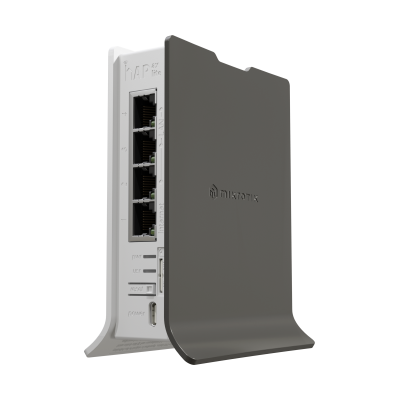


MikroTik hAP ax lite Wi-Fi 6 AX600 4×GbE USB-C ROS
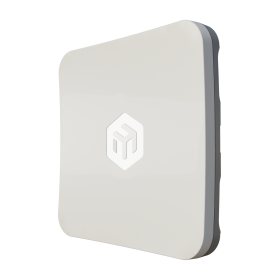
The MikroTik hAP ax lite (L41G-2axD) is a compact indoor Wi-Fi 6 home and office router — single-band 2.4 GHz 802.11ax AX600 2-chain 574 Mbps (IPQ-5010 with FG621-EA Gen6 Wi-Fi 6 chip), dual-core ARM32 IPQ-5010 at 800 MHz, MT7531BE switch chip, 256 MB RAM, 128 MB NAND, RouterOS v7 License 4, 4× Gigabit Ethernet ports, USB-C 5V power input (8W max), 4.3 dBi dual-chain internal antennas, passive cooling, IP20, -40°C to +70°C, MTBF ~100,000 hours at 25°C. CE, FCC, IC, EAC, RoHS certified. Includes 5V 2.4A 12W USB power adapter. USD 59.00. The correct entry-level Wi-Fi 6 router for home users, small offices, hotel rooms, and scalable multi-AP deployments where Wi-Fi 6 OFDMA, WPA3, and full RouterOS v7 are required at the lowest possible price point.

We only offer IC Certified products. For international products, contact us.

Ship Charge Will Display As Free Until Ship Address / Location Is Provided To Calculate Ship Charge.
The MikroTik hAP ax lite is MikroTik's entry point into Wi-Fi 6 — a compact single-band 2.4 GHz 802.11ax router that delivers Wi-Fi 6's OFDMA, MU-MIMO, WPA3, and BSS colouring in the smallest and most affordable package in MikroTik's Wi-Fi 6 lineup. At USD 59.00, it is the lowest-cost Wi-Fi 6 RouterOS device in the current MikroTik catalogue and the natural upgrade path for hAP lite (Wi-Fi 4) users who need Wi-Fi 6 without upgrading to a dual-band or higher-cost platform.
The FG621-EA is MikroTik's Gen6 Wi-Fi 6 chip — the 2.4 GHz 802.11ax radio module integrated into the hAP ax lite's IPQ-5010 platform. MikroTik describes the FG621-EA as their "latest Gen6 AX wireless chip" specifically engineered to extract maximum performance from the 2.4 GHz spectrum. The "Gen6" designation in MikroTik's own product language maps directly to 802.11ax (Wi-Fi 6) — the sixth generation of the IEEE 802.11 wireless standard. The FG621-EA chip is the hardware component that delivers Wi-Fi 6 capability to the hAP ax lite at its price point — enabling OFDMA subchannel allocation, 1024-QAM modulation, BSS colouring, and WPA3 security on the 2.4 GHz radio within MikroTik's compact low-cost router platform.
The single-band 2.4 GHz-only architecture is the key design tradeoff of the hAP ax lite. The hAP ax lite does not operate on the 5 GHz band — it is a 2.4 GHz-only Wi-Fi 6 device. For the specific use cases the hAP ax lite targets, this is a deliberate and justified tradeoff:
- **Hotel room use:** A traveller using the hAP ax lite in a hotel room to break out of a restrictive guest network needs 2.4 GHz Wi-Fi for their personal devices at close range — the hAP ax lite's compact size (fits in a suitcase), USB-C power (charges from a USB-C laptop charger or power bank), and 2.4 GHz Wi-Fi 6 coverage cover this scenario completely.
- **Scalable multi-AP hotel or office deployment:** In a hotel corridor or office floor where multiple hAP ax lite units are deployed — one per room, one per suite, or one per workstation cluster — the 2.4 GHz-only single-band radio simplifies channel planning. 2.4 GHz has three non-overlapping channels (1, 6, 11) in North America; alternating channel assignments across adjacent units prevents co-channel interference without the dual-band channel planning complexity of 2.4 GHz + 5 GHz management.
- **Budget home Wi-Fi 6 upgrade:** For a home network where the router is located centrally and the primary concern is Wi-Fi 6's OFDMA efficiency and WPA3 security rather than maximum throughput, the hAP ax lite delivers Wi-Fi 6 at the lowest available entry price in the MikroTik catalogue.
For deployments requiring 5 GHz Wi-Fi 6 or dual-band operation, the correct MikroTik alternatives are the hAP ax², hAP ax³, or the outdoor mANTBox ax 15s — each adding 5 GHz at higher price points.
Wi-Fi 6's operational improvements over Wi-Fi 5 (802.11ac) on the 2.4 GHz band are meaningful in the hAP ax lite's target deployment scenarios:
- **OFDMA (Orthogonal Frequency-Division Multiple Access):** In a hotel room or office with multiple client devices — a laptop, a phone, a tablet, and a smart TV — all connected simultaneously, Wi-Fi 6 OFDMA subdivides the 2.4 GHz channel into resource units (RUs) allocated simultaneously to multiple clients. Wi-Fi 5 serves clients round-robin one at a time; Wi-Fi 6 serves multiple clients in parallel within the same transmission window. For a shared network with 5–15 simultaneous active clients — a typical hotel room or small office scenario — OFDMA's parallel client servicing significantly improves per-client latency and aggregate throughput versus Wi-Fi 5.
- **BSS colouring:** In a hotel corridor or apartment building where multiple hAP ax lite units are deployed in close proximity on overlapping channels, BSS colouring allows each unit to identify its own clients' traffic versus neighbouring network traffic by a colour code embedded in the 802.11ax frame header. When an hAP ax lite detects a BSS colour different from its own, it can proceed with its own transmission rather than deferring — reducing the inter-network interference problem that degrades Wi-Fi 5 performance in dense residential and hospitality deployments.
- **WPA3 security:** WPA3-PSK (SAE — Simultaneous Authentication of Equals) replaces WPA2-PSK's pre-shared key handshake with a Dragonfly key exchange that provides forward secrecy — a past session's traffic cannot be decrypted even if the Wi-Fi password is later compromised. WPA3-EAP and OWE (opportunistic wireless encryption) are also supported. For a hotel deployment where guest Wi-Fi security is a guest satisfaction and liability consideration, WPA3 is the current security standard.
- **Up to 90% speed increase:** MikroTik's own product page states the hAP ax lite can deliver up to 90% speed increase over its predecessor depending on setup. This reflects the combined contribution of OFDMA parallel scheduling, 1024-QAM higher-order modulation, and improved Wi-Fi 6 channel management — not a simple radio throughput comparison.
The 4× Gigabit Ethernet ports are a meaningful specification upgrade over the hAP lite's 5× Fast Ethernet (100 Mbps) ports. The hAP ax lite's 4× Gigabit Ethernet ports — managed by the MT7531BE switch chip — provide true 1 Gbps wired connectivity on all four ports simultaneously. For a home or small office deployment where wired devices (a desktop PC, a NAS, a network printer, a smart TV) need full Gigabit connectivity alongside Wi-Fi 6 wireless, the hAP ax lite's 4× Gigabit ports deliver without speed limitations on the wired side. The MT7531BE is a MediaTek enterprise-grade switch ASIC providing hardware-offloaded Gigabit switching — the same switch chip family used across MikroTik's managed switch portfolio.
The USB-C 5V power input is the hardware decision that maximises the hAP ax lite's portability and deployment flexibility. USB-C 5V at 8W maximum — powered by the included 5V 2.4A 12W USB power adapter, or by any USB-C power source capable of 5V 1.6A or above:
- A USB-C laptop charger (virtually all modern laptop chargers output 5V via USB-C)
- A USB-C power bank (any USB-C power bank at 5V output)
- A USB-C port on a smart TV, monitor, or router
- A 5V USB-C PoE splitter output
For a hotel room deployment, the hAP ax lite can be powered directly from the room's USB charging outlet or the USB-C port on the room's smart TV — no wall adapter required beyond the included one. For a temporary deployment at a conference, event, or remote site, any USB-C power source powers the hAP ax lite. This is the only MikroTik indoor router in the current catalogue that accepts USB-C 5V power — all other hAP models use DC barrel or PoE-in.
The dual-core ARM32 IPQ-5010 at 800 MHz with 256 MB RAM is the same CPU platform as the L11UG-5HaxD, mANTBox ax 15s, and NetBox 5 ax — providing consistent RouterOS v7 performance across MikroTik's 2024–2025 Wi-Fi 6 product line. 256 MB RAM on a 2.4 GHz-only indoor router provides significantly more headroom than the application demands — RouterOS v7 routing, firewall, NAT, DHCP, WireGuard VPN, CAPsMAN, and concurrent Wi-Fi 6 radio management consume well under 256 MB in a home or small office deployment. The RAM headroom supports future RouterOS v7 feature additions without memory constraints.
RouterOS v7 License 4 on the hAP ax lite provides the full residential and SMB routing feature set — PPPoE client for direct ISP connection, DHCP server, NAT, STP/RSTP bridging, firewall packet filter, WireGuard VPN, OpenVPN client, L2TP/IPsec, hotspot gateway for hotel captive portal deployments, CAPsMAN CAP for centralised Wi-Fi management, and VLAN for network segmentation. The hotspot gateway feature is particularly relevant for hotel and hospitality deployments — RouterOS's built-in Hotspot feature provides a customisable captive portal for guest Wi-Fi authentication, time-based access, bandwidth limits per user, and usage logging, without a separate hotspot controller or cloud subscription.
CAPsMAN integration allows fleets of hAP ax lite units in a hotel or office deployment to receive their SSID, security, channel, and power configuration from a central RouterOS CAPsMAN controller — a CCR2004, CRS, or any RouterOS device running the CAPsMAN controller. Central management of 10, 50, or 200 hAP ax lite units via CAPsMAN allows SSID changes, security policy updates, and channel optimisations to be pushed to all units simultaneously from a single management interface, rather than configuring each unit individually.
The 4.3 dBi dual-chain internal antenna gain is notably higher than the hAP lite's predecessor antennas — MikroTik explicitly highlights this as an upgrade on the product page. 4.3 dBi on a 2.4 GHz indoor AP is the upper end of the practical range for compact indoor AP internal antennas, providing directional gain that improves signal strength in the forward hemisphere of the antenna orientation. For a wall-mounted or desk-placed hAP ax lite, 4.3 dBi internal antennas deliver measurably better 2.4 GHz coverage radius versus lower-gain predecessors.
**Canadian market note — IC certification confirmed:** The hAP ax lite is certified CE, FCC, IC, EAC, and RoHS — IC (ISED) certification is confirmed. The hAP ax lite can be listed and sold for Canadian indoor wireless operation without an IC certification advisory. Confirm the specific IC certification number from the regulatory documentation for listing purposes.
**5-year software support guarantee:** RouterOS v7 updates free for life of product or minimum 5 years from date of purchase.
Key specifications:
- **Product code:** L41G-2axD
- **Architecture:** ARM 32-bit
- **CPU:** IPQ-5010, dual-core ARM32, 800 MHz
- **Wi-Fi chip:** FG621-EA (MikroTik Gen6 802.11ax)
- **Switch chip:** MT7531BE
- **RAM:** 256 MB
- **Storage:** 128 MB NAND
- **OS:** RouterOS v7, License 4
- **Wi-Fi 2.4 GHz:** 802.11b/g/n/ax, Wi-Fi 6, 2-chain, 574 Mbps max, 4.3 dBi internal antennas
- **Wi-Fi speed class:** AX600 (single-band 2.4 GHz)
- **Wi-Fi security:** WPA3-PSK, WPA3-EAP, OWE, MFP
- **Ethernet:** 4× 10/100/1000 Mbps (MT7531BE switch)
- **Power input:** 1× USB-C, 5V, 8W max
- **Cooling:** Passive
- **IP rating:** IP20
- **Operating temperature:** -40°C to +70°C
- **MTBF:** ~100,000 hours at 25°C
- **Mode button:** Yes
- **Certifications:** CE, FCC, IC, EAC, RoHS — IC confirmed
- **Included:** 5V 2.4A 12W USB power adapter
- **Suggested price:** USD 59.00

- Product code
- L41G-2axD&FG621-EA
- Architecture
- ARM 64bit (RouterOS 32bit)
- CPU
- Dual-Core IPQ-5010 800 MHz
- Switch chip model
- MT7531BE
- Operating System
- RouterOS v7, License level 4
- Size of RAM
- 128 MB, NAND
- Storage size
- 128 MB, NAND
- Number of DC inputs
- 1 USB type C
- Max Power consumption
- 12 W
- Max power consumption without attachments
- 12 W
- 3G Category
- R8 (42.2Mbps Downlink, 11.2Mbps Uplink)
- 3G bands
- 1 (2100MHz) / 3 (1800MHz) / 5 (850MHz) / 8 (900MHz)
- Dimensions
- 124 x 100 x 54 mm
- Number of SIM slots
- 1
- Wireless 2.4 GHz standards
- 802.11b/g/n/ax
- LTE Category
- 6 (300Mbit/s Downlink, 50Mbit/s Uplink)
- LTE FDD bands
- 1 (2100MHz) / 3 (1800MHz) / 5 (850MHz) / 7 (2600MHz) / 8 (900 MHz) / 20 (800MHz) / 28 (700MHz)
- LTE TDD bands
- 38 (2600MHz) / 40 (2300MHz) / 41 (2500MHz)
- TAC
- 86335904
- Operating Temperature
- -40°C to +60°C
- Bands
- 2.4 GHz
- Input Voltage
- 5 V
- Antenna gain
- 4.3 dBi
- Number of 1G Ethernet ports
- 4
- Wireless interface model
- IPQ-5010
- LTE modem
- FG621-EA
General information
All students who attend the Training can receive a free L4 license from MikroTik. Training should be at least three days long.
Students are allowed to take the certification test ONLY upon the attendance of individual training course, in the class, under the supervision of a MikroTik Certified Training Partner.
Each certification test consists of a pre-defined % of random questions (multiple choice and true/false) from specific question categories. Items also have a difficulty parameter. MTCNA test is generated from more straightforward questions, Advanced tests – from more difficult questions.
Only one attempt is allowed. The test must be finished within one hour. The passing grade is set to 60%. There are 25 questions in the exam.
Certificate numbers and RouterOS L4 licenses are assigned automatically by MikroTik. Students can see their certificates and generate license keys once logged into the account server. Printed documents from MikroTik cost USD 30 per piece. Shipping is not included.
Remote training sessions and certification exams are not allowed.
MikroTik Certification Test without prior attendance of particular MikroTik Training Session is not allowed.
Wireless Netware offers every participant a free RouterBOARD hAP-ac-lite.
The price includes class attendance, course materials, coffee breaks and lunch, "Only for local Training." The amount does not cover travel and accommodation expenses.
Please bring (very important): Laptop, power extension strip (10ft./3m) with five sockets, one long Ethernet cable (16ft./5m+) and several short Ethernet cables.
Cost: Early bird price for the course is $850. It is valid 15 days before the scheduled session, referring to the MikroTik Training website. The price will be $1050 after the early bird date. The price includes class attendance, course materials, coffee breaks and lunch," Only for local Training." The amount does not cover travel and accommodation expenses. Seating is limited to only four students. The seat is reserved and guaranteed just after the payment is received in full amount.
Certificates will only be valid for three years.
Become a consultant: It's simple if you have MTCNA (score 75%+) and at least one valid MikroTik Engineer level certificate (MTCRE, MTCWE, MTCTCE, MTCUME or MEDICINE) with score 75%+, apply by email with your mikrotik.com account name and fields of expertise and MikroTik will add you to the list. To stay on the consultant list, you will have to have valid certificates, participate in the MikroTik Forum and attend the ...M.U.M. events in your country conducting RouterOS case studies or workshops for the rest of the attendees.
By purchasing any of "Training Courses," you signify your agreement to these terms and conditions. If you do not agree to these Terms and Conditions, do not use this Site or Service. *WNT may modify this ...T.O.C. at any time and such changes will be effective on the date that such modified ...T.O.C. is posted on this Site. Use of the Site or Service after such changes have taken effect constitutes acceptance of all changes. Training classes, courses, and workshops may be subject to additional notices, class/course descriptions and policies (collectively "Additional Terms"), all of which are made part of this ...T.O.C. by this reference. If there is any conflict between this ...T.O.C. and Additional Terms posted for or applicable to a specific part of Sites such as training course description, the latter supersedes concerning using that particular part of the Site or accurate Service, please read these terms carefully, and keep a copy of them for your reference.
Returns:
All returns to WNT LTD. are handled as exchanges or store credit toward a future purchase. All returns must have a valid ...R.M.A. Number. To request an ...R.M.A. number, log into your account and select. ...R.M.A. from the options menu at the left of your screen. Identify the order and the product you wish to ...R.M.A. and follow instructions on the screen. Once your ...R.M.A. request is received, our ...R.M.A. The team will review your application and respond within two business days or sooner. All products returned for an exchange or store credit must be returned within 30 days of the invoice date. Defective products received by the customer as ...D.O.A. must be reported within seven days. Shipping errors, such as incorrect quantities or incorrect product received, must be reported within seven days. Products purchased from our Clearance Sale, Overstock, Open Box or Special Order (...S.P.O.), or non-stocked items, or custom-assembled products, cannot be returned or exchanged. Order shipments, which arrived damaged, must have a completed. "Damage Parcel Report" with ...U.P.S., USPS, or DHL. All products being returned must be shipped pre-paid. Returns sent C.O.D. will not be accepted and returned to the shipper at the customer's expense. If the repair is under warranty, WNT LTD. will return the product to the customer, within Canada-Post, using Standard Service at no charge. Expedited shipping methods, international shipping costs, customs fees, and duties are the customer's sole responsibility. For non-warranty returns, the customer is responsible for all related shipping costs. All products being returned for store credit must be in the original box with all accessories, warranty cards and instructional sheets, and new, unused condition with the factory seal intact. We do not accept returns for products that have been opened or have missing parts, manuals, warranty cards, or damaged when returned (unless it's ...D.O.A.). A 25% restocking fee will apply. To ensure that the product remains in returnable condition, do not use the product box as the shipping box. You must repackage in another box with appropriate packing materials. Products arriving in a product box will be returned to the shipper at the customer's expense. The customer is responsible for adequately packaging the products returned. Contents of the package not matching the information on the ...R.M.A. form will be cause for the return of ALL equipment.