

MikroTik wAP ax AX3000 Wi-Fi 6 Outdoor AP RouterOS v7
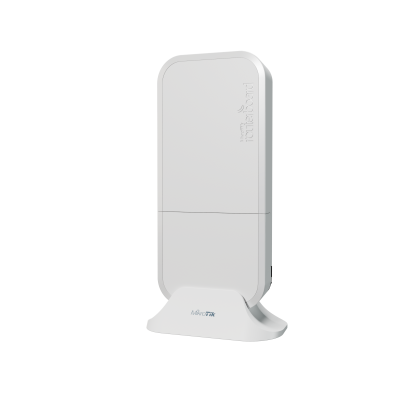
The MikroTik wAP ax is a compact dual-band Wi-Fi 6 outdoor and indoor access point — AX3000 with 2×2 MIMO on both 2.4 GHz (574 Mbps, IPQ-5010, 6.9 dBi) and 5 GHz (2,400 Mbps, QCN-6102, 7 dBi), dual-core ARM32 IPQ-5010 at 800 MHz, 256 MB RAM, 128 MB NAND, 2× Gigabit Ethernet ports with 802.3af/at PoE-in, DC jack (12–57V), passive cooling, IP54, -40°C to +70°C, RouterOS v7 License 4, 9W max. WPA3/OWE, CAPsMAN-ready, fast roaming. CE, FCC, IC, EAC, and RoHS certified — fully IC-certified for Canadian sale. Includes 24V 0.8A power adapter, Gigabit PoE injector, desktop stand, ceiling mount bracket, wAP mount, K-52 fastening set, hose clamp, and plastic zip tie.

We only offer IC Certified products. For international products, contact us.

Ship Charge Will Display As Free Until Ship Address / Location Is Provided To Calculate Ship Charge.
The MikroTik wAP ax is the Wi-Fi 6 generation of MikroTik's wAP platform — a product line that has shipped continuously across multiple Wi-Fi generations and built a reputation specifically for outdoor and semi-outdoor deployments where the combination of weatherproofing, compact size, mounting flexibility, and RouterOS management is difficult to match at this price point. The wAP form factor is not new — it is a tested, proven outdoor AP enclosure design with a known installation record in rural environments, public spaces, hospitality deployments, and remote commercial locations globally. The wAP ax brings Wi-Fi 6 (802.11ax) to that proven platform without changing the enclosure geometry, mounting hardware, or installation approach that the previous wAP generations established.
The AX3000 Wi-Fi 6 classification — 574 Mbps at 2.4 GHz and 2,400 Mbps at 5 GHz — is derived from the maximum data rates on each band with 2×2 MIMO clients. The 2.4 GHz Wi-Fi 6 improvement is the figure MikroTik highlights: up to 90% faster than 802.11n at 2.4 GHz under the same channel conditions. The 2.4 GHz band improvement is particularly relevant for outdoor and rural deployments where 2.4 GHz is preferred for range — 2.4 GHz propagates further than 5 GHz at the same transmit power, penetrates obstacles better, and is the band of choice for IoT devices, legacy cameras, and clients at the edge of coverage. The Wi-Fi 6 OFDMA and BSS colouring improvements on 2.4 GHz are meaningful in environments with neighbouring Wi-Fi networks — BSS colouring reduces effective co-channel interference, improving real-world throughput in congested 2.4 GHz environments.
The 5 GHz radio (QCN-6102, 2,400 Mbps max) provides the high-throughput band for clients within closer range — laptops, phones, and tablets connecting at distances where 5 GHz signal quality is sufficient. The 7 dBi antenna gain on 5 GHz (versus 6.9 dBi at 2.4 GHz) is consistent with the wAP platform's integrated antenna design — both bands benefit from above-average antenna gain relative to the physical size of the enclosure, contributing to the wAP's coverage performance in outdoor line-of-sight and near-line-of-sight conditions.
Wi-Fi 6 security across both bands: WPA3-PSK, WPA3-EAP, OWE (Opportunistic Wireless Encryption), and management frame protection. OWE is specifically relevant for the wAP ax's target deployment scenarios — rural gas stations, bus stops, campgrounds, outdoor hospitality areas, and public spaces where open Wi-Fi access is required but client session encryption is still desirable. OWE provides per-client encrypted sessions on an open SSID without requiring a password — guests connect to the open network and their traffic is encrypted without any additional configuration on the client side. For any public Wi-Fi deployment where the operator cannot or does not want to distribute a password, OWE is the correct security configuration and the wAP ax supports it natively.
CAPsMAN integration (MikroTik's wifi-qcom CAPsMAN for RouterOS v7) allows multiple wAP ax units to be managed centrally from a single RouterOS controller device. For a deployment covering a large rural property — a farm, a resort, a campground, a marina, or an outdoor event venue — where multiple wAP ax units are mounted at different coverage points, CAPsMAN manages SSID policy, security configuration, channel assignment, and roaming policy from a single controller rather than per-device configuration. Fast transition roaming (802.11r-compatible) allows client devices to move between wAP ax coverage zones without re-authentication delays — a direct improvement in client experience for users moving through a multi-AP deployment.
The two Gigabit Ethernet ports are a hardware differentiator for the wAP ax versus single-port outdoor APs in the same price range. Two Ethernet ports allow the wAP ax to be used in a pass-through wired network topology — the upstream network connection enters on Ether1 (PoE-in), and Ether2 provides a downstream wired connection to a device at the mounting location without requiring a separate switch. For a rural deployment where the wAP ax is mounted at a building entry point and a wired device (a PoS terminal, a security camera, a network switch for a small room) is co-located at the mounting point, Ether2 provides the wired downstream connection without additional hardware. The 802.3af/at PoE-in on Ether1 allows the wAP ax to be powered from a PoE switch or the included Gigabit PoE injector — a single cable from the PoE source carries both power and data to the mounting point.
The DC jack input (12–57V) provides an alternative direct power option when PoE is not available at the installation location — a 12V or 24V power supply at the mounting point powers the wAP ax directly. The included 24V 0.8A power adapter and Gigabit PoE injector provide complete out-of-box power flexibility for both input methods.
The vandalproof and discrete design is the physical characteristic MikroTik calls out specifically. The wAP ax can be wall-mounted with the fastening hardware fed through the back of the enclosure from inside the wall — the visible exterior surface is a flush-mounted enclosure with no exposed screws and no obvious cable entry points. For deployments in public spaces where equipment tampering or vandalism is a risk — bus stops, petrol stations, outdoor kiosks, public parks — the low-profile flush-mount installation reduces the visual target profile. The IP54 weatherproofing (dust-protected, splash-resistant from any direction) covers standard outdoor moisture exposure without requiring an additional enclosure.
The included mounting hardware set is the most comprehensive in this product batch — desktop stand, ceiling mount bracket, wAP mount, K-52 fastening set, hose clamp, and plastic zip tie are all included. The wAP ax supports wall mount, ceiling mount, pole mount (via hose clamp), and desktop placement (via desktop stand) without any additional hardware purchase. For a multi-site deployment where installation conditions vary — some wall mounts, some pole mounts, some ceiling mounts — the complete hardware set covers all standard scenarios out of the box.
RouterOS v7 on License 4 runs on a dual-core ARM32 IPQ-5010 at 800 MHz with 256 MB RAM and 128 MB NAND — the same CPU and memory configuration as the NetBox 5 ax. License 4 covers the access point, CAPsMAN client, VPN, firewall, and QoS use cases the wAP ax is designed for. Software updates are included for the life of the product, guaranteed minimum 5 years from purchase.
Maximum power consumption is 9W — the same as the NetBox 5 ax — making the wAP ax one of the lowest-power dual-band Wi-Fi 6 APs in the MikroTik outdoor product line. A single 802.3af switch port (15.4W rated, 12.95W at device) powers the wAP ax with headroom to spare. For multi-unit deployments powered from a central PoE switch, the 9W per-unit draw allows a standard 802.3af switch to power multiple wAP ax units without requiring 802.3at or 802.3bt per port.
**Canadian market note:** The wAP ax carries CE, FCC, IC, EAC, and RoHS certifications — the complete certification set including IC (ISED) and FCC, with FCC Grants of Certification for both 2.4 GHz and 5 GHz published on the product page. **No Canadian certification advisory is required.** List with full confidence for the Canadian market. This is one of three fully IC-certified active Wi-Fi devices in this product batch alongside the Groove 52 and Chateau PRO ax.
Key specifications:
- **Wi-Fi 2.4 GHz:** 802.11b/g/n/ax, Wi-Fi 6, 2-chain, 574 Mbps max, 6.9 dBi, IPQ-5010
- **Wi-Fi 5 GHz:** 802.11a/n/ac/ax, Wi-Fi 6, 2-chain, 2,400 Mbps max, 7 dBi, QCN-6102
- **Wi-Fi speed class:** AX3000
- **Wi-Fi security:** WPA3-PSK, WPA3-EAP, OWE, management frame protection
- **Ethernet:** 2× 10/100/1000 Mbps Gigabit Ethernet
- **PoE-in:** 802.3af/at, 18–57V (Ether1)
- **DC jack input:** 12–57V
- **Max power consumption:** 9W
- **Cooling:** Passive
- **CPU:** IPQ-5010, dual-core ARM32, 800 MHz
- **RAM:** 256 MB
- **Storage:** 128 MB NAND
- **OS:** RouterOS v7, License 4
- **IP rating:** IP54
- **Operating temperature:** -40°C to +70°C
- **MTBF:** ~100,000 hours at 25°C
- **Monitors:** CPU temperature, PCB temperature, voltage
- **Certifications:** CE, FCC, IC, EAC, RoHS — fully IC-certified for Canadian sale
- **Included:** 24V 0.8A power adapter, Gigabit PoE injector, desktop stand, ceiling mount bracket, wAP mount, K-52 fastening set, hose clamp (1), plastic zip tie
- **Product code:** wAPG-5HaxD2HaxD
Note: ARM 32-bit architecture — not ARM 64-bit. Two Gigabit Ethernet ports — Ether1 is PoE-in; confirm Ether2 pass-through wired capability in RouterOS configuration before deployment. Dimensions and weight not published on product page — confirm from brochure.

- Product code
- wAPG-5HaxD2HaxD
- CPU core count
- 4
- CPU nominal frequency
- 800 MHz
- Dimensions
- 185 x 85 x 30 mm
- Architecture
- ARM 64bit (RouterOS 32bit)
- Size of RAM
- 256 MB
- Storage size
- 128 MB
- Storage type
- NAND
- Wireless 2.4 GHz standards
- 802.11b/g/n/ax
- Antenna gain dBi for 2.4 GHz
- 2
- Operating System
- RouterOS
- Max Power consumption
- 12
- Tested ambient temperature
- -40 to +70C
- Number of DC inputs
- 2 (PoE-IN, DC jack)
- Max power consumption without attachments
- 9 W
- PoE in
- 802.3af/at
- PoE in input Voltage
- 18-57 V
- 10/100/1000 Ethernet ports
- 2
- Voltage Monitor
- Yes
- PCB temperature monitor
- Yes
- Wireless 2.4 GHz number of chains
- 2
- Wireless 2.4 GHz chip model
- IPQ-5010
- Wireless 5 GHz number of chains
- 2
- Wireless 5 GHz standards
- 802.11a/n/ac/ax
- Antenna gain dBi for 5 GHz
- 2.5
- Wireless 5 GHz chip model
- QCN-6102
General information
All students who attend the Training can receive a free L4 license from MikroTik. Training should be at least three days long.
Students are allowed to take the certification test ONLY upon the attendance of individual training course, in the class, under the supervision of a MikroTik Certified Training Partner.
Each certification test consists of a pre-defined % of random questions (multiple choice and true/false) from specific question categories. Items also have a difficulty parameter. MTCNA test is generated from more straightforward questions, Advanced tests – from more difficult questions.
Only one attempt is allowed. The test must be finished within one hour. The passing grade is set to 60%. There are 25 questions in the exam.
Certificate numbers and RouterOS L4 licenses are assigned automatically by MikroTik. Students can see their certificates and generate license keys once logged into the account server. Printed documents from MikroTik cost USD 30 per piece. Shipping is not included.
Remote training sessions and certification exams are not allowed.
MikroTik Certification Test without prior attendance of particular MikroTik Training Session is not allowed.
Wireless Netware offers every participant a free RouterBOARD hAP-ac-lite.
The price includes class attendance, course materials, coffee breaks and lunch, "Only for local Training." The amount does not cover travel and accommodation expenses.
Please bring (very important): Laptop, power extension strip (10ft./3m) with five sockets, one long Ethernet cable (16ft./5m+) and several short Ethernet cables.
Cost: Early bird price for the course is $850. It is valid 15 days before the scheduled session, referring to the MikroTik Training website. The price will be $1050 after the early bird date. The price includes class attendance, course materials, coffee breaks and lunch," Only for local Training." The amount does not cover travel and accommodation expenses. Seating is limited to only four students. The seat is reserved and guaranteed just after the payment is received in full amount.
Certificates will only be valid for three years.
Become a consultant: It's simple if you have MTCNA (score 75%+) and at least one valid MikroTik Engineer level certificate (MTCRE, MTCWE, MTCTCE, MTCUME or MEDICINE) with score 75%+, apply by email with your mikrotik.com account name and fields of expertise and MikroTik will add you to the list. To stay on the consultant list, you will have to have valid certificates, participate in the MikroTik Forum and attend the ...M.U.M. events in your country conducting RouterOS case studies or workshops for the rest of the attendees.
By purchasing any of "Training Courses," you signify your agreement to these terms and conditions. If you do not agree to these Terms and Conditions, do not use this Site or Service. *WNT may modify this ...T.O.C. at any time and such changes will be effective on the date that such modified ...T.O.C. is posted on this Site. Use of the Site or Service after such changes have taken effect constitutes acceptance of all changes. Training classes, courses, and workshops may be subject to additional notices, class/course descriptions and policies (collectively "Additional Terms"), all of which are made part of this ...T.O.C. by this reference. If there is any conflict between this ...T.O.C. and Additional Terms posted for or applicable to a specific part of Sites such as training course description, the latter supersedes concerning using that particular part of the Site or accurate Service, please read these terms carefully, and keep a copy of them for your reference.
Returns:
All returns to WNT LTD. are handled as exchanges or store credit toward a future purchase. All returns must have a valid ...R.M.A. Number. To request an ...R.M.A. number, log into your account and select. ...R.M.A. from the options menu at the left of your screen. Identify the order and the product you wish to ...R.M.A. and follow instructions on the screen. Once your ...R.M.A. request is received, our ...R.M.A. The team will review your application and respond within two business days or sooner. All products returned for an exchange or store credit must be returned within 30 days of the invoice date. Defective products received by the customer as ...D.O.A. must be reported within seven days. Shipping errors, such as incorrect quantities or incorrect product received, must be reported within seven days. Products purchased from our Clearance Sale, Overstock, Open Box or Special Order (...S.P.O.), or non-stocked items, or custom-assembled products, cannot be returned or exchanged. Order shipments, which arrived damaged, must have a completed. "Damage Parcel Report" with ...U.P.S., USPS, or DHL. All products being returned must be shipped pre-paid. Returns sent C.O.D. will not be accepted and returned to the shipper at the customer's expense. If the repair is under warranty, WNT LTD. will return the product to the customer, within Canada-Post, using Standard Service at no charge. Expedited shipping methods, international shipping costs, customs fees, and duties are the customer's sole responsibility. For non-warranty returns, the customer is responsible for all related shipping costs. All products being returned for store credit must be in the original box with all accessories, warranty cards and instructional sheets, and new, unused condition with the factory seal intact. We do not accept returns for products that have been opened or have missing parts, manuals, warranty cards, or damaged when returned (unless it's ...D.O.A.). A 25% restocking fee will apply. To ensure that the product remains in returnable condition, do not use the product box as the shipping box. You must repackage in another box with appropriate packing materials. Products arriving in a product box will be returned to the shipper at the customer's expense. The customer is responsible for adequately packaging the products returned. Contents of the package not matching the information on the ...R.M.A. form will be cause for the return of ALL equipment.