

MikroTik MT-HotSwapFan Hot-Swappable Replacement Fan CCR2216
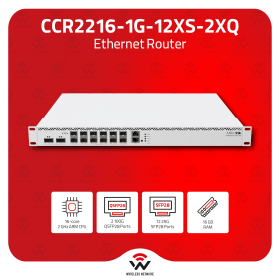
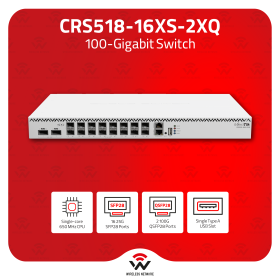
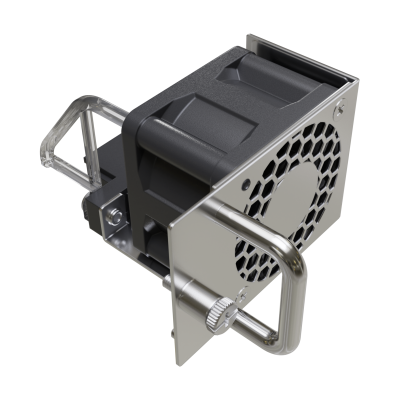
The MikroTik MT-HotSwapFan is a hot-swappable replacement fan unit for MikroTik's high-density enterprise routing and switching hardware — including the CCR2216 and CRS518 — allowing a failed fan to be replaced live under full traffic load, with no device power-down, no downtime, and no service interruption. ~100,000-hour MTBF at 25°C. The correct spare fan to stock alongside any CCR2216 or CRS518 deployment where unplanned downtime is unacceptable.

We only offer IC Certified products. For international products, contact us.

Ship Charge Will Display As Free Until Ship Address / Location Is Provided To Calculate Ship Charge.
The MikroTik MT-HotSwapFan answers a specific operational problem: a fan fails in a live CCR2216 or CRS518 in a production environment. Without hot-swap fan capability, replacing the fan means powering down the device — taking the router or switch offline, interrupting traffic, and creating a service outage at the moment the hardware has already partially failed. The MT-HotSwapFan eliminates that scenario entirely. The failed fan module pulls out of the running device and the replacement inserts in its place — while the device remains powered on, under full load, passing traffic — with no shutdown, no reboot, and no service interruption.
Hot-swap fan capability is standard in enterprise and carrier-grade network hardware — server-class chassis, core routers, and data centre switches have offered hot-swap fans for decades precisely because fan failure is one of the most common hardware failure modes in active network equipment, and because the thermal consequence of running without a fan is rapid and severe. The CCR2216 and CRS518 are MikroTik's highest-density enterprise platforms — multi-core cloud core routers and high-port-count switches deployed in carrier PoPs, data centres, and large enterprise networks where continuous operation is a hard requirement. The MT-HotSwapFan brings the same hot-swap serviceability that enterprise buyers expect from carrier-grade hardware to the MikroTik platform.
The operational case for stocking the MT-HotSwapFan as a spare before it is needed is straightforward. Fan failure in active network equipment rarely provides advance warning — MTBF is a statistical mean, not a guaranteed minimum. A CCR2216 or CRS518 that has been running for several years in a warm equipment room is at elevated fan failure risk. When a fan fails, the response time to replacement directly determines whether the device survives the thermal event. An MT-HotSwapFan already on the shelf means replacement in minutes. An MT-HotSwapFan ordered after failure means waiting for shipping while the device runs hot or is powered down. For any deployment where the CCR2216 or CRS518 is carrying production traffic, stocking at least one spare MT-HotSwapFan per device is the correct operational posture.
The ~100,000-hour MTBF at 25°C (approximately 11.4 years mean time between failures at 25°C) is the published reliability figure — consistent with the MTBF published for other MikroTik fan-cooled products in the catalogue. In practice, fan MTBF degrades meaningfully above 25°C — equipment room ambient temperatures of 30–35°C, common in Canadian summer conditions without precision cooling, reduce effective fan life. The MT-HotSwapFan's hot-swap design means the degraded fan is replaced at first sign of failure monitoring alert rather than at the point of complete failure — extending the effective service life of the host device.
MikroTik's RouterOS fan health monitoring (available on CCR2216 and CRS518) provides real-time fan speed and temperature data accessible via Winbox, the web interface, SNMP, and RouterOS scripting. A network monitoring system polling fan RPM via SNMP can alert on fan degradation — reduced RPM, increased RPM variance, or fan stop events — before complete failure. The MT-HotSwapFan closes the operational loop: monitoring detects the degrading fan, the on-shelf spare is retrieved, and the swap is executed live without a maintenance window.
Key specifications:
- **Compatible devices:** CCR2216, CRS518 — confirm additional compatible devices with your MikroTik distributor
- **Hot-swap:** Yes — live replacement under full load, no device power-down required
- **MTBF:** ~100,000 hours at 25°C
- **Certifications:** Not published on product page — confirm from brochure or distributor
- **Product code:** MT-HotSwapFan
Note: Compatibility is confirmed for CCR2216 and CRS518. Confirm compatibility with any other MikroTik fan-cooled device before purchasing. The MT-HotSwapFan is a replacement/spare unit — it is not a standalone device and has no function outside a compatible host chassis.

General information
All students who attend the Training can receive a free L4 license from MikroTik. Training should be at least three days long.
Students are allowed to take the certification test ONLY upon the attendance of individual training course, in the class, under the supervision of a MikroTik Certified Training Partner.
Each certification test consists of a pre-defined % of random questions (multiple choice and true/false) from specific question categories. Items also have a difficulty parameter. MTCNA test is generated from more straightforward questions, Advanced tests – from more difficult questions.
Only one attempt is allowed. The test must be finished within one hour. The passing grade is set to 60%. There are 25 questions in the exam.
Certificate numbers and RouterOS L4 licenses are assigned automatically by MikroTik. Students can see their certificates and generate license keys once logged into the account server. Printed documents from MikroTik cost USD 30 per piece. Shipping is not included.
Remote training sessions and certification exams are not allowed.
MikroTik Certification Test without prior attendance of particular MikroTik Training Session is not allowed.
Wireless Netware offers every participant a free RouterBOARD hAP-ac-lite.
The price includes class attendance, course materials, coffee breaks and lunch, "Only for local Training." The amount does not cover travel and accommodation expenses.
Please bring (very important): Laptop, power extension strip (10ft./3m) with five sockets, one long Ethernet cable (16ft./5m+) and several short Ethernet cables.
Cost: Early bird price for the course is $850. It is valid 15 days before the scheduled session, referring to the MikroTik Training website. The price will be $1050 after the early bird date. The price includes class attendance, course materials, coffee breaks and lunch," Only for local Training." The amount does not cover travel and accommodation expenses. Seating is limited to only four students. The seat is reserved and guaranteed just after the payment is received in full amount.
Certificates will only be valid for three years.
Become a consultant: It's simple if you have MTCNA (score 75%+) and at least one valid MikroTik Engineer level certificate (MTCRE, MTCWE, MTCTCE, MTCUME or MEDICINE) with score 75%+, apply by email with your mikrotik.com account name and fields of expertise and MikroTik will add you to the list. To stay on the consultant list, you will have to have valid certificates, participate in the MikroTik Forum and attend the ...M.U.M. events in your country conducting RouterOS case studies or workshops for the rest of the attendees.
By purchasing any of "Training Courses," you signify your agreement to these terms and conditions. If you do not agree to these Terms and Conditions, do not use this Site or Service. *WNT may modify this ...T.O.C. at any time and such changes will be effective on the date that such modified ...T.O.C. is posted on this Site. Use of the Site or Service after such changes have taken effect constitutes acceptance of all changes. Training classes, courses, and workshops may be subject to additional notices, class/course descriptions and policies (collectively "Additional Terms"), all of which are made part of this ...T.O.C. by this reference. If there is any conflict between this ...T.O.C. and Additional Terms posted for or applicable to a specific part of Sites such as training course description, the latter supersedes concerning using that particular part of the Site or accurate Service, please read these terms carefully, and keep a copy of them for your reference.
Returns:
All returns to WNT LTD. are handled as exchanges or store credit toward a future purchase. All returns must have a valid ...R.M.A. Number. To request an ...R.M.A. number, log into your account and select. ...R.M.A. from the options menu at the left of your screen. Identify the order and the product you wish to ...R.M.A. and follow instructions on the screen. Once your ...R.M.A. request is received, our ...R.M.A. The team will review your application and respond within two business days or sooner. All products returned for an exchange or store credit must be returned within 30 days of the invoice date. Defective products received by the customer as ...D.O.A. must be reported within seven days. Shipping errors, such as incorrect quantities or incorrect product received, must be reported within seven days. Products purchased from our Clearance Sale, Overstock, Open Box or Special Order (...S.P.O.), or non-stocked items, or custom-assembled products, cannot be returned or exchanged. Order shipments, which arrived damaged, must have a completed. "Damage Parcel Report" with ...U.P.S., USPS, or DHL. All products being returned must be shipped pre-paid. Returns sent C.O.D. will not be accepted and returned to the shipper at the customer's expense. If the repair is under warranty, WNT LTD. will return the product to the customer, within Canada-Post, using Standard Service at no charge. Expedited shipping methods, international shipping costs, customs fees, and duties are the customer's sole responsibility. For non-warranty returns, the customer is responsible for all related shipping costs. All products being returned for store credit must be in the original box with all accessories, warranty cards and instructional sheets, and new, unused condition with the factory seal intact. We do not accept returns for products that have been opened or have missing parts, manuals, warranty cards, or damaged when returned (unless it's ...D.O.A.). A 25% restocking fee will apply. To ensure that the product remains in returnable condition, do not use the product box as the shipping box. You must repackage in another box with appropriate packing materials. Products arriving in a product box will be returned to the shipper at the customer's expense. The customer is responsible for adequately packaging the products returned. Contents of the package not matching the information on the ...R.M.A. form will be cause for the return of ALL equipment.